
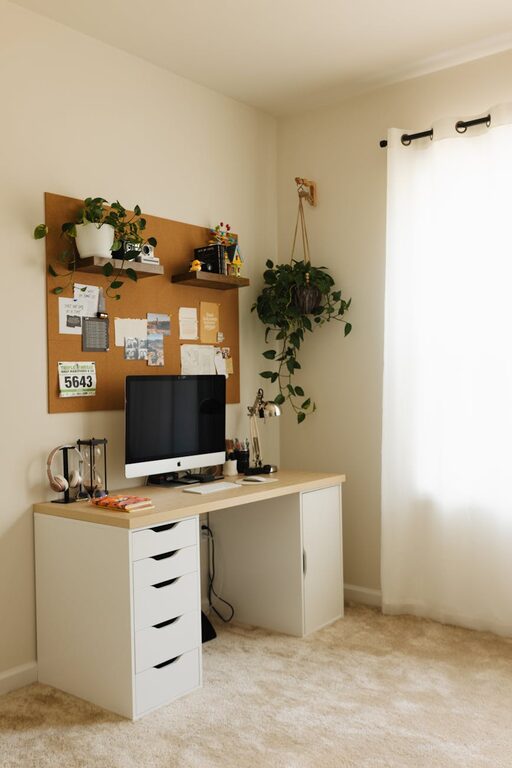
Creating a home office space that is both cozy and productive can transform your work-from-home experience. Whether you work full-time remotely or occasionally need a quiet spot for tasks, a well-designed home office helps maintain focus and comfort. Here are some practical tips to help you set up an inviting and efficient workspace in your home.
Choose the Right Location
The location of your home office matters a lot. Ideally, pick a quiet area away from household distractions such as the TV or high-traffic zones. If space allows, a separate room is best because it provides clear boundaries between work and personal life.
If a separate room isn’t an option, try to designate a specific corner or nook in a quieter part of your home. Natural light is important too, so placing your desk near a window can boost mood and reduce eye strain.
Invest in Comfortable and Ergonomic Furniture
Comfort is key when you’re spending long hours at your desk. Investing in an ergonomic chair helps support your posture and reduces the risk of back pain. Look for chairs with adjustable height, lumbar support, and good cushioning.
Your desk should be the right height so your arms rest comfortably while typing. If you can, consider a sit-stand desk to alternate between sitting and standing throughout the day, promoting better circulation and reducing fatigue.
Organize Your Space Efficiently
A clutter-free workspace boosts productivity and focus. Use storage solutions like shelves, cabinets, and desk organizers to keep papers, stationery, and tech gadgets neatly arranged. Label storage bins or drawers to make items easier to find.
Cable management is often overlooked but essential. Use clips, sleeves, or cable boxes to keep cords tidy and prevent tangling. This not only looks better but keeps your work area safer.
Personalize Your Workspace
Adding personal touches creates a cozy and inviting atmosphere. Display photos, artwork, or inspirational quotes that motivate you. A few plants can add color and improve air quality while bringing a sense of calm to the room.
Choose decor and colors that make you feel comfortable but avoid overly distracting patterns. Soft, neutral colors or calming blues and greens tend to create a peaceful environment conducive to concentration.
Optimize Lighting
Good lighting helps reduce eye strain and keeps you energized. Aim for a mix of natural and artificial lighting. Position your desk near a window if possible, but avoid glare on your computer screen.
Supplement with adjustable desk lamps or overhead lighting. Warm light bulbs create a cozy mood, while cooler white lights can help keep you alert during work hours.
Minimize Distractions
To maintain productivity, try to keep your workspace free from distractions. If you live with others, communicate your work hours so they respect your need for focus. Use noise-canceling headphones or play background music or white noise if it helps you concentrate.
Keep your phone on silent or in another room if notifications disrupt your work. Set specific times to check emails and messages instead of responding constantly.
Maintain Good Air Quality and Temperature
A comfortable temperature and fresh air contribute to a pleasant working environment. Open windows when weather allows for ventilation. If your room tends to get too warm or cold, consider small fans or space heaters for climate control.
Indoor plants can also improve air quality and add a refreshing atmosphere to your home office.
Take Breaks and Move Regularly
Even with a perfect setup, it’s important to take regular breaks for your health and productivity. Follow the 20-20-20 rule: every 20 minutes, look at something 20 feet away for 20 seconds to reduce eye strain.
Stand up, stretch, or walk around every hour to keep your body active and reduce stiffness. Consider incorporating short exercises or yoga poses into your break routine.
Use Technology Tools Wisely
Several apps and tools can help maintain productivity in your home office. Calendar apps, task managers, and focus timers can keep you on track with deadlines and daily goals.
However, avoid overloading your desktop with too many apps or notifications. Customize your digital workspace to fit your work style and minimize distractions from unnecessary software.
Keep Your Workspace Clean
A clean workspace promotes a positive mindset. Make a habit of tidying your home office at the end of each workday. Wipe surfaces, streamline paperwork, and put away items to start fresh the next morning.
Regular deep cleaning, including dusting and vacuuming, makes your home office healthier and more pleasant.
—
Creating a home office that balances coziness and productivity is about thoughtful planning and ongoing maintenance. With the right location, furniture, lighting, and habits, you can build a space that supports your work goals while keeping you comfortable and inspired throughout the day.
Try out these tips, and customize your workspace to fit your unique needs and preferences. A welcoming and efficient home office is within reach!